
- How to log in to Casiku UK
- Check your credentials before submitting
- Login or registration: choose the right action
- Casiku login on mobile and desktop
- Sign in through a mobile browser
- Sign in on a computer
- Move between devices after changing your password
- Reset your Casiku password
- Use your account username for recovery
- Complete the reset and update saved credentials
- Problems receiving account emails
- Password-reset email has not arrived
- Account-validation email has not arrived
- Forgotten username or lost access to your registered email
- You cannot remember your username
- You no longer use the registered email address
- Diagnose Casiku login problems
- Password or account details are rejected
- An account-blocked message appears
- The login page does not load or respond
- Login succeeds but the session does not stay active
- Get help with an unresolved login issue
- Prepare information that helps support diagnose the problem
- Keep your Casiku login details private
- Manage saved passwords on personal devices
- Sign out after using a shared device
How to log in to Casiku UK
To log in to Casiku, open the official website, select Login and enter your account credentials in the fields shown. Submit the form to access your existing account. If you have forgotten your password, use password recovery rather than repeatedly trying different combinations.
Keep your username available. Casiku accounts use a username and password, and the password-recovery form specifically requests your username before sending a message to your registered email address.
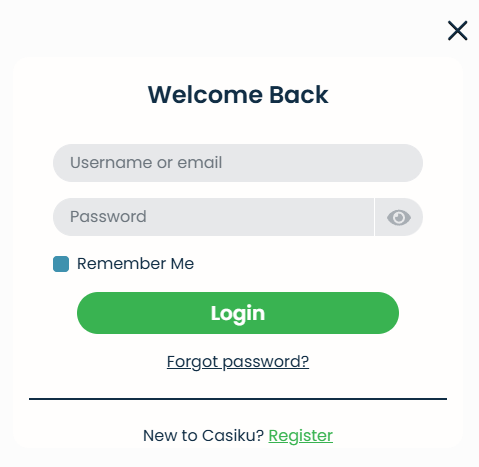
- Open the Casiku website in your browser.
- Select Login.
- Enter the account identifier requested by the form and your current password.
- Check the entries, particularly if your browser filled them automatically.
- Submit the form and follow any account-specific instructions displayed.
If access fails, read the error message before deciding what to do next. Rejected credentials call for different checks from a page that will not load or a message saying that the account is blocked.
Check your credentials before submitting
Look for accidental spaces at the beginning or end of copied details. Check Caps Lock and, on a phone, whether the keyboard has automatically capitalised or changed an entry. Password characters should match the password you set.
Autofill can also supply an older password or select the wrong saved account entry. If you have recently changed your password, replace the saved version before trying again. Entering the details manually once can help you identify whether autofill is causing the problem.
When you cannot remember the password, go directly to password recovery. Further guesses are less useful than resetting the credential you need.
Login or registration: choose the right action
Login is for returning customers who already have a Casiku account. Register is the entry point for creating an account for the first time. Both options appear on the website, but they serve different purposes.
If you have previously registered and now cannot access your account, work through recovery or contact support about that account. Opening a registration form does not restore access to your existing details.
Casiku login on mobile and desktop
You can access Casiku through its website on a computer or mobile browser. Start from the same website and use your existing account credentials. Changing devices does not mean you need to register again.
The amount of navigation visible on screen can vary with the display size. Look for the Login option shown on the website rather than relying on a particular corner of the screen or a menu arrangement remembered from another device.
Sign in through a mobile browser
Open Casiku in your phone’s browser and select Login. Before submitting, check what the mobile keyboard or password manager has entered. A saved password may be correct while the account identifier belongs to another saved entry.
If the form seems unresponsive, dismiss the keyboard so you can see the rest of the page, then check for any message beside the fields. If the problem continues, try another browser on the device. This can help distinguish a browser problem from rejected account details.
Sign in on a computer
On a desktop or laptop, open Casiku and use the Login option in the website navigation. Check the selected saved credential if your browser offers more than one account entry.
After submitting, allow the page to finish responding before making another attempt. If a message appears, use its wording to choose the appropriate recovery or troubleshooting step. Refreshing repeatedly can make it harder to see what the website is asking you to correct.
Move between devices after changing your password
A password reset can leave an older credential saved on another phone, computer or browser profile. If the new password works on one device but fails on another, check the saved entry on the device where access is failing.
Enter the replacement password manually, then update the password manager entry. Also check whether separate browser profiles hold separate copies of the login. Updating one saved entry does not necessarily update every independently stored copy.
Reset your Casiku password
Casiku’s Forgot Password page asks for your username. A recovery email is sent to the email address registered to the account, and you use the link in that message to continue the reset.
Have access to that mailbox before starting. The username identifies the account for recovery; the registered email address is where you receive the next instructions.
- Open the password-recovery page.
- Enter your Casiku username in the field provided.
- Submit the request using the control shown.
- Open the registered email inbox and locate the recovery message.
- Follow the email link and complete the displayed password instructions.
- Return to Casiku Login and use your replacement password.
Choose a password that you do not use for another service. Follow the requirements displayed during the reset rather than assuming a particular length or character combination.
Use your account username for recovery
Enter the username associated with your Casiku account. Your email address has a separate role in this process: it receives the recovery message. Do not automatically substitute the email address for the username requested by the form.
If you cannot remember the username, check your saved account entry or previous account correspondence. If that does not resolve it, contact support for help with the existing account.
Complete the reset and update saved credentials
Follow the recovery instructions through to completion, then return to the website to sign in. If the link displays an error or cannot be used, return to password recovery and follow the available instructions rather than repeatedly reopening the same failed link.
Once the replacement password works, update your saved credentials. An old password left in autofill can produce another rejected login even though the reset itself succeeded.
Problems receiving account emails
An expected email may be in a different folder from your main inbox or may have been sorted by a mailbox rule. Start by checking the email account registered with Casiku, then look through spam, junk and other filtered folders.
Keep the purpose of the message clear. A password-reset email helps you change a forgotten password. An account-validation email concerns validation of your account details. Looking for the right message makes it easier to follow the correct next step.
| Email you are expecting | What to check | Next action |
|---|---|---|
| Password-reset email | The registered mailbox, spam/junk folders and email filters | Use the recovery message to continue the reset, or contact support if delivery remains a problem |
| Account-validation email | Spam/junk folders and previous account messages | Follow the validation link or ask support for assistance |
| Reply to an account-access enquiry | The mailbox used for your enquiry and the existing conversation | Continue the same support conversation with relevant details |
Password-reset email has not arrived
Check that you are looking in the mailbox linked to your Casiku account. If you use several email addresses, the inbox currently open on your phone or computer may not be the registered one.
Search the mailbox for Casiku messages and check whether a filter has moved them into another folder. Also review blocked-sender settings if expected account messages are being filtered. If you still cannot locate the recovery email, contact Help and Contact and explain that you are trying to reset your password.
Account-validation email has not arrived
For a missing validation link, check spam and junk folders first. If the message is there, follow its instructions and return to the website.
If you cannot locate it, use Casiku’s account help or contact support through live chat or playerinbox@casiku-uk-casino.com. Describe the message you are waiting for as an account-validation email so the enquiry is handled as the correct type of account issue.
Forgotten username or lost access to your registered email
Password recovery depends on two things: knowing the username and being able to receive the message in the registered mailbox. If either is missing, address that part of the process before sending more recovery requests.
Casiku provides live chat and email support for account enquiries. Explain which detail you have lost access to and follow the instructions supplied for your account. Keep the enquiry focused on recovering the existing account.
You cannot remember your username
Check the saved Casiku entry in your browser or password manager. Review previous account correspondence for information that helps identify the account.
If you still cannot establish the username, contact support. Explain that the recovery form requests it and that you need help identifying your existing account. Do not include your password in the enquiry.
You no longer use the registered email address
If the mailbox still exists, try recovering access through the email provider first. Regaining that access may allow you to complete Casiku’s normal password-recovery process.
If you cannot access the mailbox, contact Casiku through Help and Contact. State that you cannot receive recovery messages at the registered address. Follow the account-specific instructions provided, rather than assuming that entering a different email address will redirect the recovery message.
Diagnose Casiku login problems
Start with what you can observe: whether credentials are rejected, whether the page responds and whether an account message is displayed. This helps you avoid changing browser settings when the actual problem is a forgotten password.
The following checks give you a practical starting point. They do not replace instructions shown for your account.
| Login problem | First useful action | When to move on |
|---|---|---|
| Password is rejected | Check typing and saved credentials | Use password recovery if you cannot establish the correct password |
| Username is forgotten | Review saved account details and correspondence | Contact support if the username remains unresolved |
| Account-blocked message appears | Read the message and follow its instructions | Consult account help or support when assistance is needed |
| Login form does not load or respond | Check the connection and try another browser | Use technical help if the problem persists |
| You return to Login after signing in | Check whether browser settings restrict site cookies | Contact support if the session problem continues |
Password or account details are rejected
Check the account identifier, password and selected autofill entry. Remove unintended spaces and make sure you are using the latest password.
If the same details continue to fail, use recovery instead of repeating uncertain guesses. Casiku’s account help addresses blocking after incorrect password attempts, so repeated submissions are not a useful way to resolve a forgotten credential.
An account-blocked message appears
Read the message in full and follow any instructions it gives. A blocked-account message needs attention to the account itself; switching browsers does not replace those instructions.
Use the Account FAQ for relevant account guidance. If you need support, provide the exact wording of the message and explain what happened immediately before it appeared. Do not assume that every access restriction has the same cause.
The login page does not load or respond
First check whether your connection can load other websites. If the connection is working, reload Casiku once and try opening it in another browser. An incognito or private window can also help you compare behaviour without the same stored browsing session.
If another browser works, examine the original browser’s site data, extensions and settings. Use an up-to-date browser and change one setting at a time so you can see what affects the problem. Before clearing data, make sure you know your account credentials.
If the issue remains, use Casiku’s technical help. Record whether the form is blank, fails to submit or displays an error.
Login succeeds but the session does not stay active
Casiku uses essential cookies to create the account session and session cookies to support activity across website pages. Browser settings that block or repeatedly remove site cookies are therefore worth checking when you keep returning to Login.
Review cookie permissions for the website. If you clear Casiku’s site cookies, expect to sign in again afterwards. Avoid repeatedly deleting all browsing data without checking the result of each change, as this can remove useful preferences and disrupt other signed-in websites.
If the problem continues in another browser, record what happens after submission and contact support with those details.
Get help with an unresolved login issue
Use Casiku’s Help and Contact page to reach live chat, or email playerinbox@casiku-uk-casino.com. Explain the access problem directly: forgotten username, missing recovery email, rejected credentials, blocked-account message or an unresponsive page.
Include what you have already tried. This helps the support team distinguish a recovery problem from a technical fault and reduces the need to repeat the same checks.
Prepare information that helps support diagnose the problem
A useful account-access enquiry includes:
- The exact error message or a description of what appears on screen.
- Whether the problem happens before or after submitting the login form.
- The device and browser you are using.
- Whether another browser behaves differently.
- The recovery or troubleshooting steps already attempted.
- A screenshot of the problem, with sensitive information removed.
Do not send your password or a password-recovery link. Check screenshots for visible personal details before sharing them. If you already have a support conversation about the issue, continue that conversation so the earlier information stays together.
Keep your Casiku login details private
Keep your Casiku password confidential and use a unique password for the account. A password manager can help you store it accurately, but check that the selected entry belongs to Casiku before filling the form.
How you finish a session also matters. On a personal device, keep saved credentials current. On a shared device, avoid leaving either the account or the password accessible to the next person.
Manage saved passwords on personal devices
After changing your password, update the saved Casiku entry and remove obsolete copies where appropriate. If you store credentials in several browser profiles or password managers, check each one you use.
When autofill causes repeated errors, compare the stored username with your account details and enter the current password manually. Correcting the saved entry addresses the underlying problem rather than working around it on every visit.
Sign out after using a shared device
Use the website’s sign-out control when you finish, and avoid saving your password in a browser that other people can access. Closing a tab alone should not be treated as a substitute for signing out.
Before leaving the device, check that the account is no longer open. If you accidentally saved credentials on a shared computer, remove that saved entry. Change the password if you believe someone else may have obtained it.
Access Casiku Casino Login
Use your registered details to continue and access the current offer.

Bonuses October 2026